
Payments: Billing
How to change your plan
Before you start
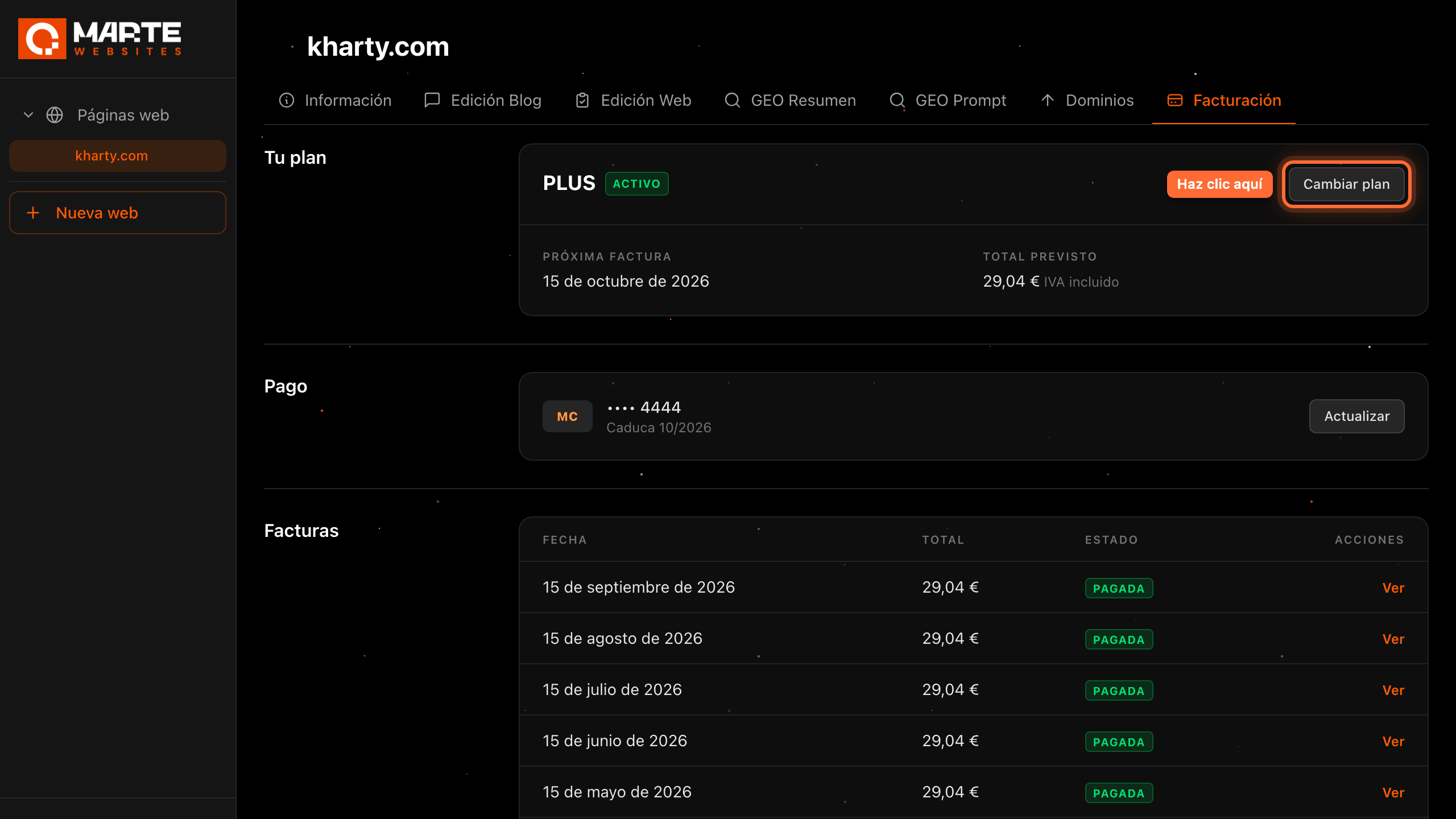
From your website's "Facturación" (Billing) tab you can move to any of the 5 aMarte Websites plans: PLUS (€24/month), PRO (€65/month), GEO (€85/month), PLUS+GEO (€99/month) and PRO+GEO (€120/month), all plus VAT. The change is immediate and your billing date stays the same. Before confirming you will see exactly what is charged today and what your next invoice will be. The panel is in Spanish, so this guide quotes its labels in Spanish with their meaning in brackets.
Tip: The PLUS+GEO and PRO+GEO packs cost less than the two plans separately: you save €10 and €30 a month respectively. This guide uses the fictitious website "Kharty", on the PLUS plan, as its example.
Step by step
Step 1
Open your website's "Facturación" (Billing) tab
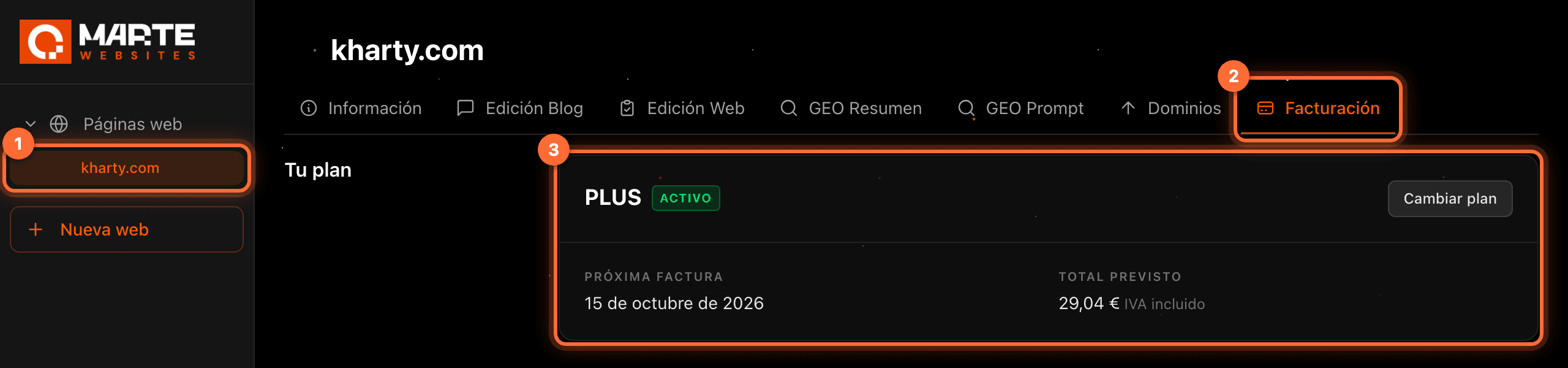
Sign in to the aMarte Websites panel. In the left-hand menu, under "Páginas web" (Websites), click your website (①).
At the top you will see the website's tabs: click "Facturación" (Billing) (②), right after "Dominios" (Domains). The first section is "Tu plan" (Your plan) (③): it shows your plan, its status, the date of the next invoice and the expected total including VAT.
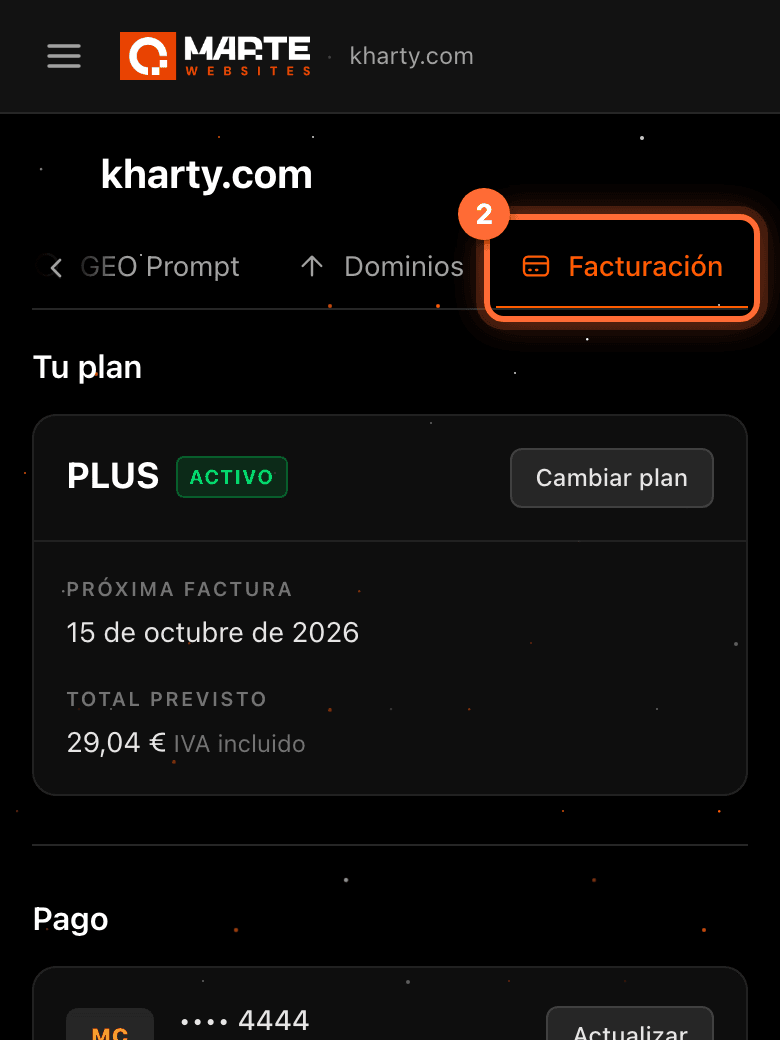
On mobile, the tab bar scrolls sideways: "Facturación" is the last tab.
Step 2
Click "Cambiar plan" (Change plan)
In the "Tu plan" (Your plan) section, click the "Cambiar plan" (Change plan) button.
If your website has no active plan, the button is disabled.

Step 3
Choose the new plan
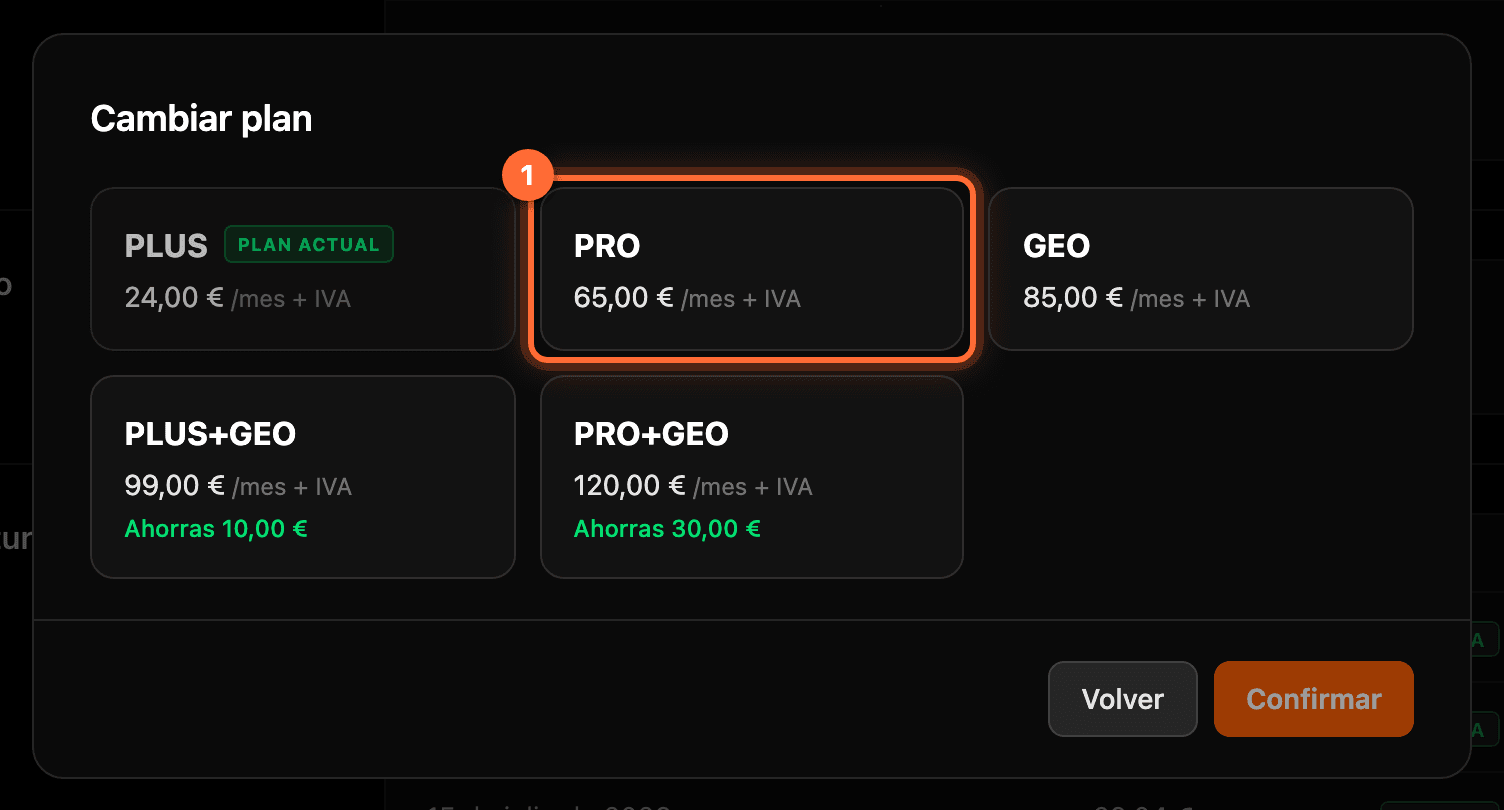
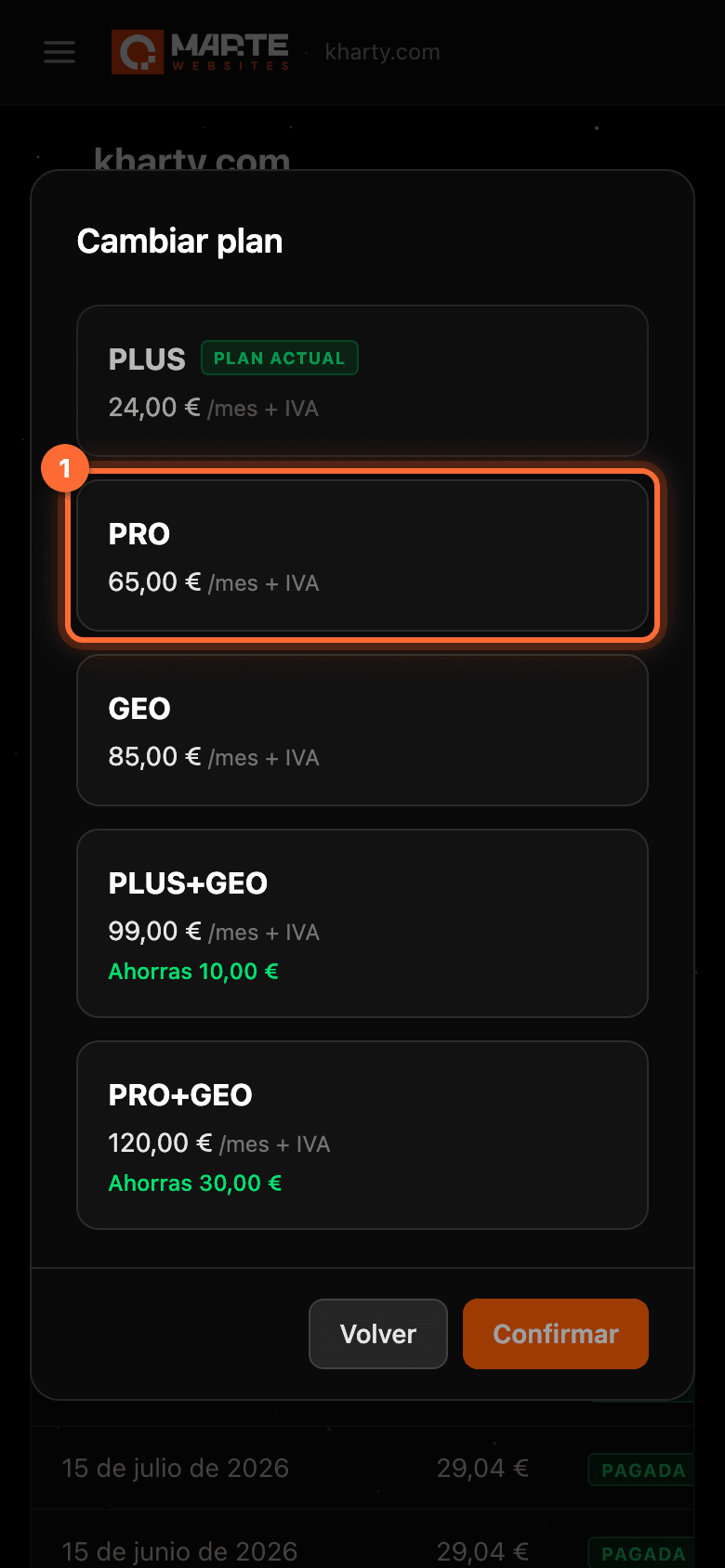
The "Cambiar plan" window opens with the 5 plans and their monthly price excluding VAT ("/mes + IVA", per month plus VAT). Your current plan is tagged "Plan actual" (Current plan). The packs also show what you save each month ("Ahorras 10,00 €" and "Ahorras 30,00 €").
Click the card of the plan you want to move to (①). In the example, Kharty moves from PLUS to PRO.
Step 4
Check the preview and click "Confirmar" (Confirm)
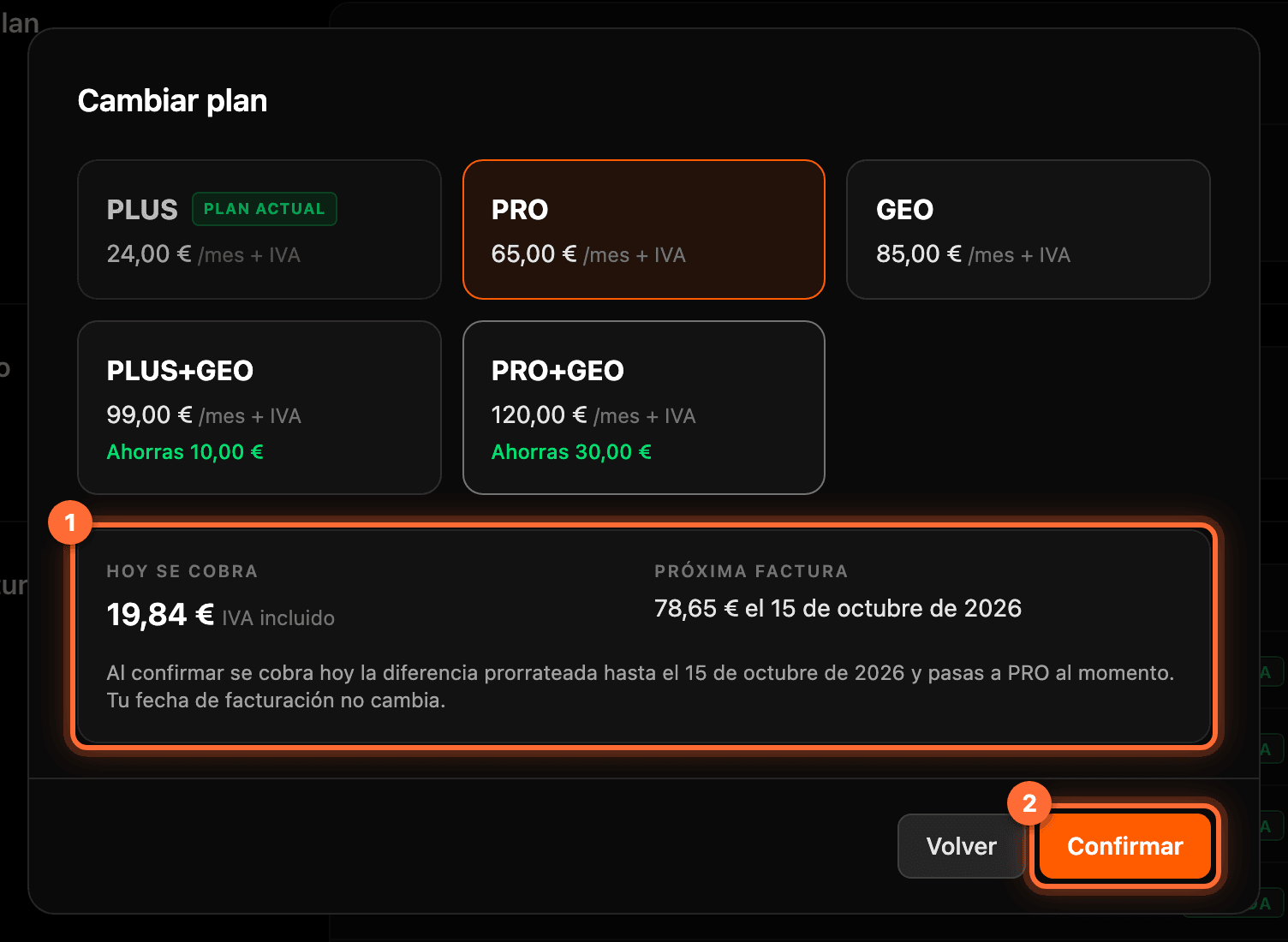
When you choose a plan, the preview of the change appears below (①), calculated on the spot: • "Hoy se cobra" (Charged today): if you move to a more expensive plan, what is charged today, VAT included. It is the price difference between the two plans for the days left until your next billing date. • "Hoy no se cobra nada" (Nothing charged today): if you move to a cheaper plan. The unused part of your current plan is taken off your next invoice. • "Próxima factura" (Next invoice): the amount and date of your next invoice.
If everything looks right, click "Confirmar" (Confirm) (②). If you would rather not change, click "Volver" (Back).
⚠ When you confirm an upgrade, the "Hoy se cobra" amount is charged right away to your saved payment method. Check the figure before clicking "Confirmar".
Step 5
Understand what is charged today and on your next invoice
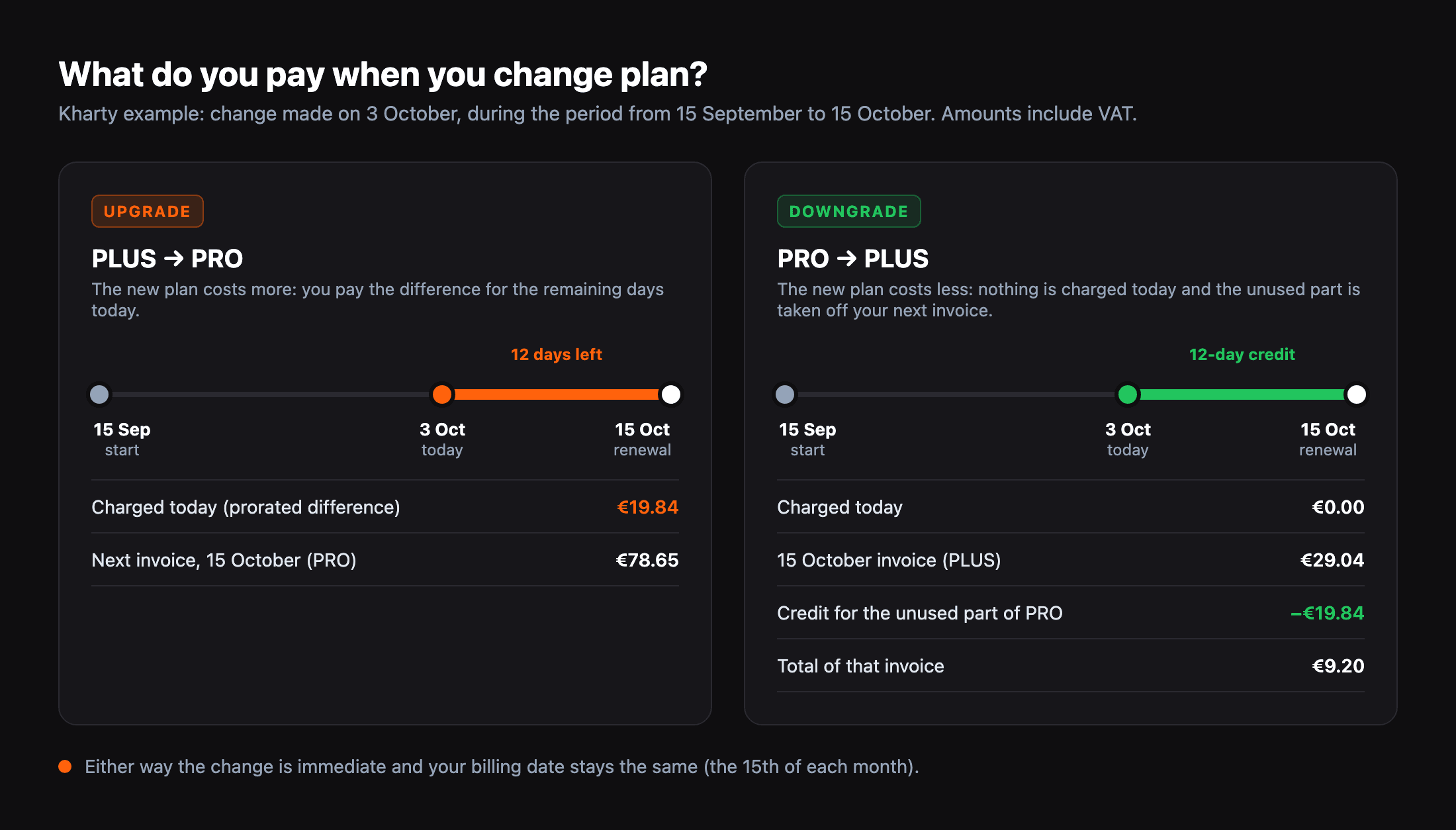
Example with Kharty, whose plan renews on the 15th of each month. On 3 October there are 12 of the period's 30 days left: • If it upgrades from PLUS to PRO, €19.84 is charged today (the difference for those 12 days, VAT included) and the full PRO price is invoiced on 15 October: €78.65. • The other way round, someone on PRO who downgrades to PLUS on the same dates pays nothing today, and their 15 October invoice (€29.04 for PLUS) has €19.84 taken off for the unused part of PRO: €9.20 in total.
Either way the change is immediate and your billing date stays the same.
Step 6
If your bank asks, confirm the payment (3-D Secure)
Some banks ask you to confirm card payments (3-D Secure). If yours does, clicking "Confirmar" opens a window from your bank over the same page so you can approve the charge, for example from its app. That screen belongs to your bank and differs from one bank to another, so it is not shown here.
Once you approve it, the change completes on its own. If you don't approve it or the bank declines the payment, the plan doesn't change, nothing is charged and you will see the message "No se ha podido cobrar el cambio de plan. Revisa tu método de pago e inténtalo de nuevo" (the plan change could not be charged; check your payment method and try again).
Step 7
Check your new plan
The window closes and "Tu plan" updates: it now shows the new plan and the expected total of your next invoice.
If the upgrade created a charge today, its invoice appears first in the "Facturas" (Invoices) section, dated today.


Step 8
If you have PLUS and GEO separately
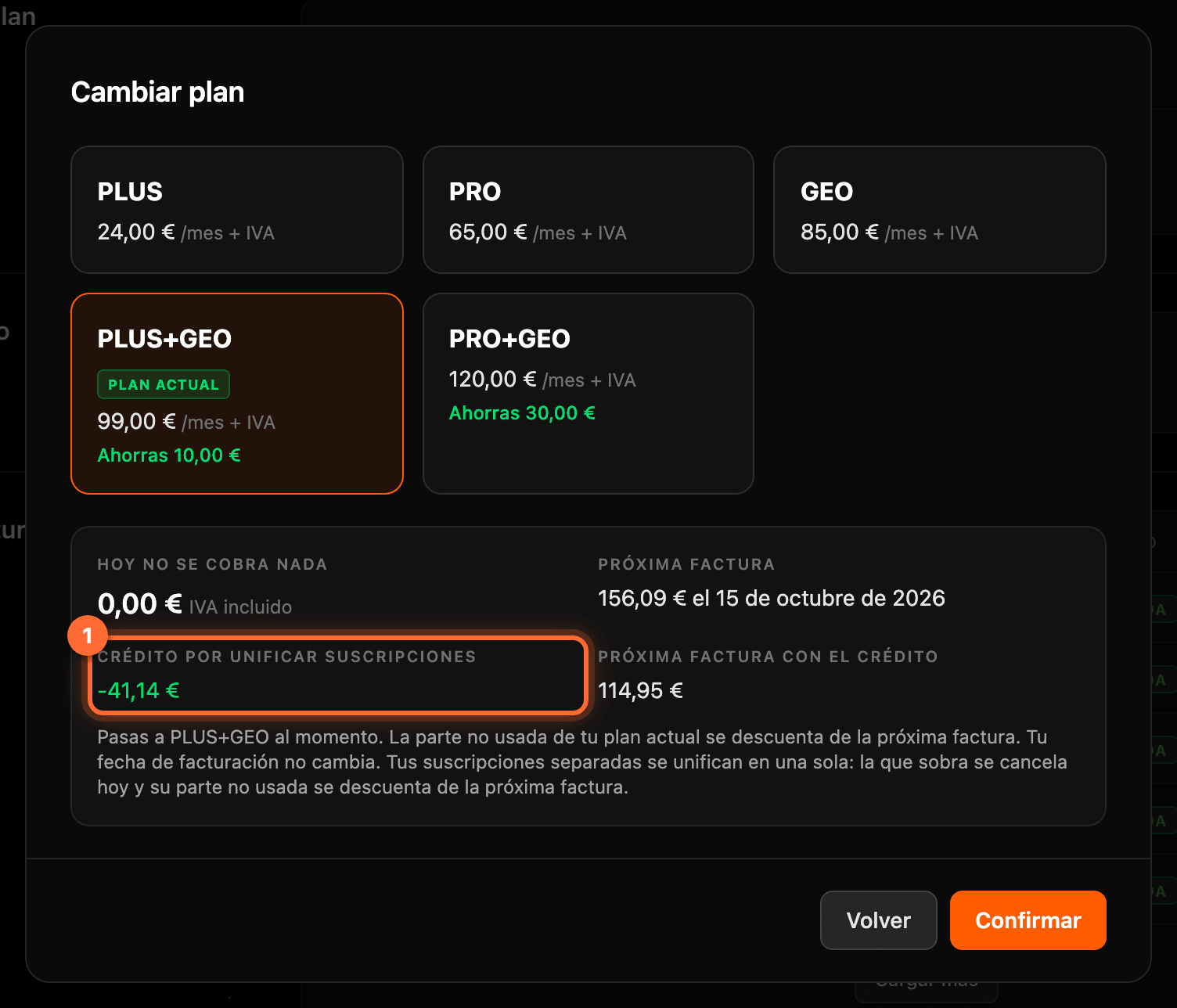
If you signed up for PLUS (or PRO) and GEO as two separate subscriptions, "Tu plan" shows "PLUS + GEO" with the note "Suscripciones separadas" (Separate subscriptions), and in "Cambiar plan" the matching pack is tagged "Plan actual". You can still choose it: that merges the two subscriptions into one and you pay the pack price. You can also choose any other plan; the subscriptions are merged just the same.
The preview then also shows the "Crédito por unificar suscripciones" (Credit for merging subscriptions) (①), which is the unused part of the subscription being cancelled and is taken off your next invoice, and the "Próxima factura con el crédito" (Next invoice with the credit). In the example, Kharty moves from PLUS (€24) and GEO (€85) separately to the PLUS+GEO pack (€99): nothing is charged today and its next invoice comes to €114.95.
Frequently asked questions
Does my billing date change?
No. Whether you upgrade or downgrade, your invoices keep being issued on the same day of each month.
Why can't I confirm the change?
The panel tells you with a message. The most common cases: you have no saved payment method ("Actualiza tu método de pago antes de cambiar de plan"; you can add one in the "Pago" (Payment) section), you have an unpaid invoice ("Tienes una factura pendiente de pago. Págala antes de cambiar de plan") or your plan already has a scheduled cancellation ("Tu plan tiene la baja programada, no se puede cambiar de plan"). If you see "Este plan no se puede cambiar desde el panel. Escríbenos y lo gestionamos", contact support.
I took a while to confirm and the amount changed. What do I do?
The preview expires after 15 minutes or when the amount changes. If that happens, the panel recalculates it on its own and tells you ("La vista previa ha caducado. Revisa la nueva vista previa" or "El importe ha cambiado. Revisa la nueva vista previa"): check the new figure and click "Confirmar" again.
When I merge PLUS and GEO with an upgrade, when is the credit applied?
The upgrade of your main plan is charged today and, once it is paid, the leftover subscription is cancelled. Its unused part doesn't reduce today's charge: it is taken off your next invoice. The preview shows you the three figures separately before you confirm.