
Ecommerce: Store
Turn sales of a product on or off with a single toggle
What is it?
Every product in your store has a toggle, «Enable purchase options», that decides whether that product can be bought. Use it to stop selling a product for a while, for example a uniform item that is out of stock or out of season, and put it back on sale whenever you want, without deleting it.
Tip: Turning purchases off does not delete the product: its photos, texts and prices are kept for when you turn it back on.
Step by step
Step 1
Open the product in the editor
Go to your website editor (yourdomain.com/admin) and open the product collection, «Product Pages».
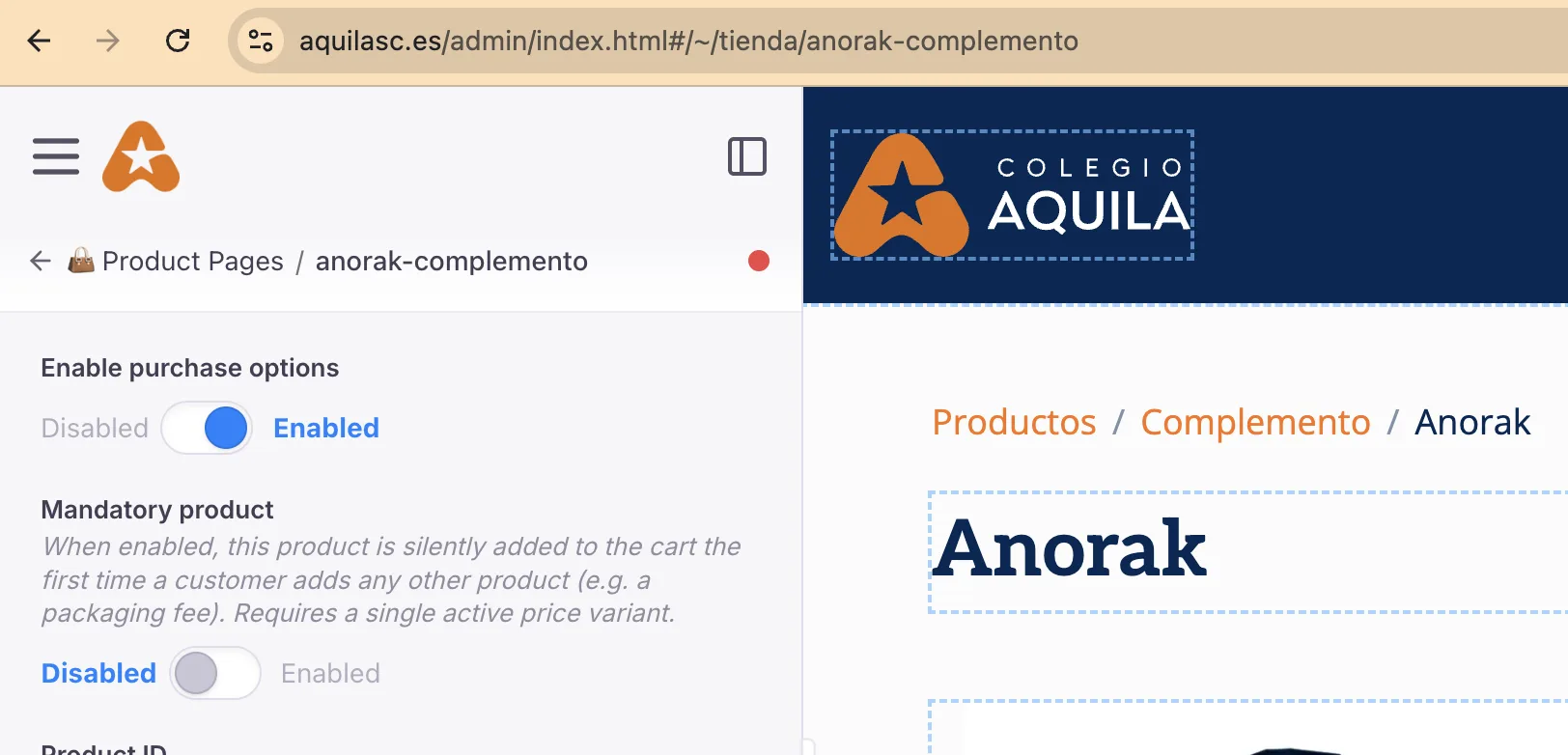
Click the product you want to change. In the example, the Anorak from the Colegio Aquila store.
Step 2
Switch the «Enable purchase options» toggle
At the very top of the left panel is the «Enable purchase options» toggle:
• Enabled (blue): the product can be bought. • Disabled (grey): the product cannot be bought.
Click the toggle to switch between them.
⚠ Right below it is «Mandatory product», which is a different option. Leave it as it is if you only want to turn sales on or off.
Step 3
Save your changes
When you switch the toggle, a red dot appears next to the product name: it means there are unsaved changes.
Click the blue «Save» button to apply them. Allow a few minutes for them to go live on your website.
Frequently asked questions
Is the product deleted when I turn purchases off?
No. Its photos, texts and prices are kept. To sell it again, set the toggle to «Enabled» and save.
How long does the change take to show?
A few minutes after you click «Save».
What is «Mandatory product» for?
When it is on, that product is added to the cart automatically the first time the customer adds any other product, for example a packaging fee. It requires the product to have a single active price.