Globalization and the Internet have connected the world in once unthinkable ways. For many businesses—especially in e-commerce—serving customers anywhere on the planet is the norm. But this accessibility brings a challenge: you must work harder to capture the attention of audiences whose first language is not English. If you plan to open up to new markets, it is essential to internationalize ("i18n") your website: prepare it to be shown in different languages and to adapt to cultural nuances and local formats (dates, currencies, nomenclature).
Fundamentals of internationalization
1. Site architecture It must allow independent versions per language or region, so that search engines recognise them as variants, not duplicate content. 2. URL structure Configure URLs that identify language and region (see next section). 3. hreflang tags They tell search engines the relationship between language versions of the same page. 4. Content Management System (CMS) The CMS must support translation, storage and publishing of multilingual content, as well as selective exclusion of pages or blocks. 5. Text expansion and contraction Plan for translations to be longer or shorter than the original, adjusting layout to avoid overflow or dead space. 6. RTL design support For right-to-left languages (Arabic, Hebrew), it may be necessary to flip the whole interface or apply specific CSS rules. 7. Content exclusion Define which sections (e.g. an internal blog or legal policies) do not require translation.
URL structures for i18n
ccTLD (yoursite.mx): strong geotargeting signal, maximum local trust, but each domain manages authority separately. Subdomain (mx.yoursite.com): isolates infrastructure by region (hosting, CDN, SSL); requires configuring Search Console and analytics per subdomain. Subdirectory (yoursite.com/mx/, /en/): inherits authority from the main domain, simplifies unified tracking and deployments; less flexible for very different infrastructures. gTLD + parameter (example.com/?lang=en-ca): easy to implement but less SEO-friendly, as Google may ignore parameters. Independent domain (example.mx): ccTLD or gTLD entirely separate; high geographic signal but maximum cost and management complexity.
Example hreflang tags
Each URL must reference all others, including self-reference; it can also be included in the XML sitemap.
Internationalization vs localization
Internationalization (i18n): prepare the architecture and technology for multiple languages and regions. Localization (l10n): adapt content—translation, cultural references, formats—for a specific target audience. Both processes are inseparable: i18n sets the foundation and l10n takes the content to the next level.
Which strategy to choose?
For most projects with a strong domain and unified teams, subdirectory (/en/, /fr/) offers the best balance of SEO and ease of maintenance. Subdomains are more flexible when each market requires independent infrastructure or teams. Independent domains (ccTLDs) are only justified when the focus is a single country and you have the resources to run multiple full sites.
Internationalization with Marte Website Builder
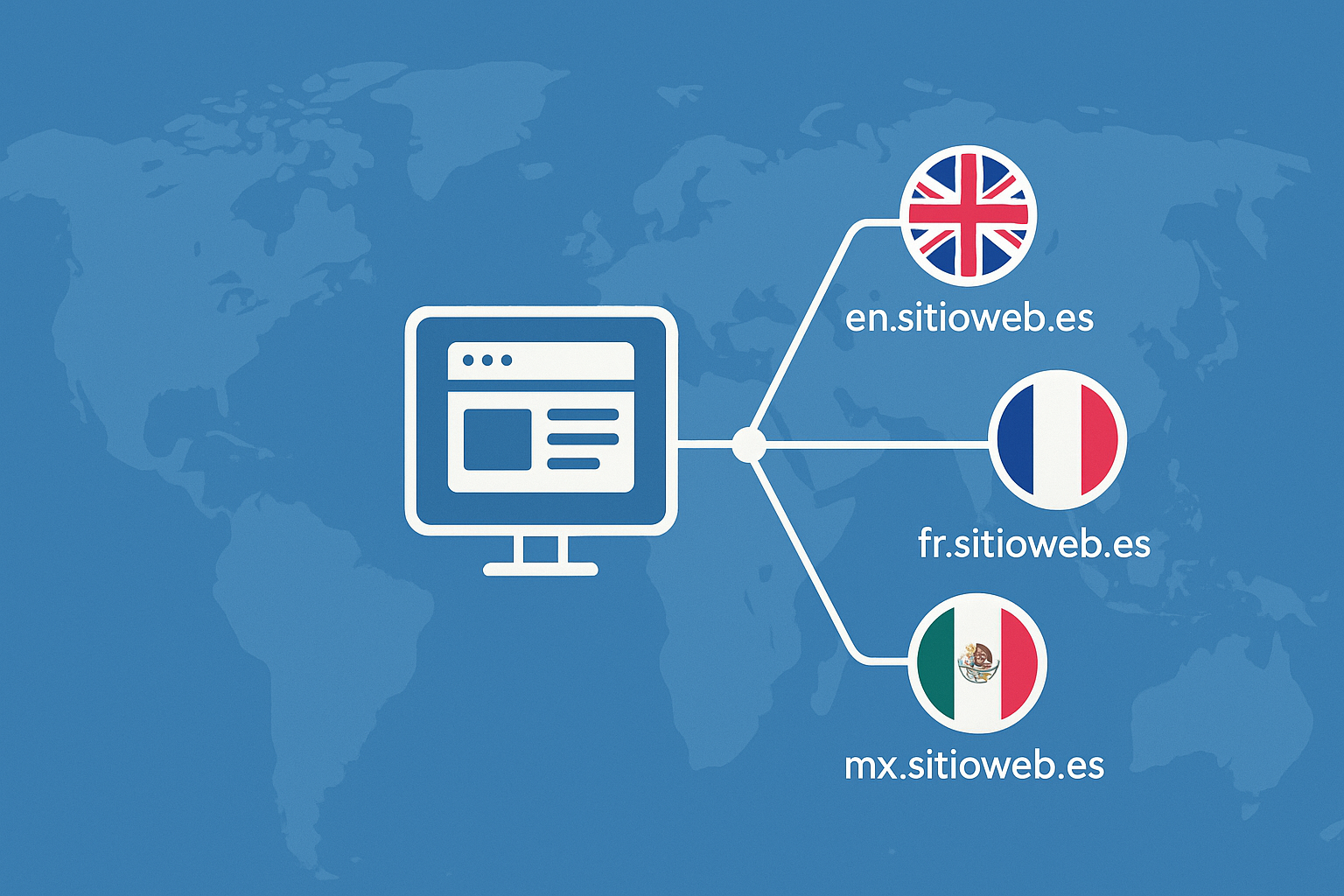
With Marte Website Builder we take localization a step further: we manage internationalization via subdomains (en.yoursite.es, fr.yoursite.es, etc.), offering:
Creation and sync of translations from a single panel. Selective exclusion of pages or content blocks by language. Independent deployments with their own SSL certificates and CDN per subdomain. Granular analytics, with Google Analytics and Search Console profiles per region, or unified when you prefer.
Advantages of the subdomain strategy with Marte Website Builder
1. Technical isolation per region Each subdomain can run in its own environment (server, CDN, certificates), making updates and testing independent. 2. Partial authority inheritance Although Google treats subdomains as separate entities, by linking them with hreflang and sitemaps they inherit part of the main domain's "link juice", speeding up ranking. 3. Scalability and performance You can size resources (CPU, bandwidth, cache) per region according to traffic demand, without interference between versions. 4. Brand clarity and local trust A specific subdomain (mx.yoursite.es) tells the user they are on the right version for their country, improving experience and conversion. 5. Integration flexibility Ideal when each market requires local payment gateways, legal modules or features that differ from one country to another. 6. Analytics and SEO control Independent Search Console properties allow fine-tuning geotargeting; in Analytics you can compare performance across regions or consolidate for a global view.
Comparison: Subdirectory, Subdomain, Independent domain. Authority: Shared, Partial with interlinking, Fully separate. SEO geotargeting: Manual, Manual, Automatic (ccTLD). Technical flexibility: Low, High, Very high. Maintenance complexity: Low, Medium, High. Tracking and analytics: Unified, Per subdomain, Per domain. Scalability: Limited, Very high, High. Recommended use case: Multilingual projects with centralized infrastructure, Independent markets with different needs, Single-country focus with local team.
With this guide and the power of Marte Website Builder, you can internationalize your website in a coherent, scalable way and with a subdomain strategy that combines technical flexibility, brand control and authority inheritance.