

User guide
How the agency dashboard works
Everything you need to know to manage your clients' websites from the Amarte dashboard.
Overview
The agency dashboard is a centralised tool where you can view and manage all the websites you have with Amarte in one place.
You access it from app.amartewebsites.com using the credentials we provide when you sign up as an agency. Each agency only sees their own clients — access is completely separated between agencies.
Website cards
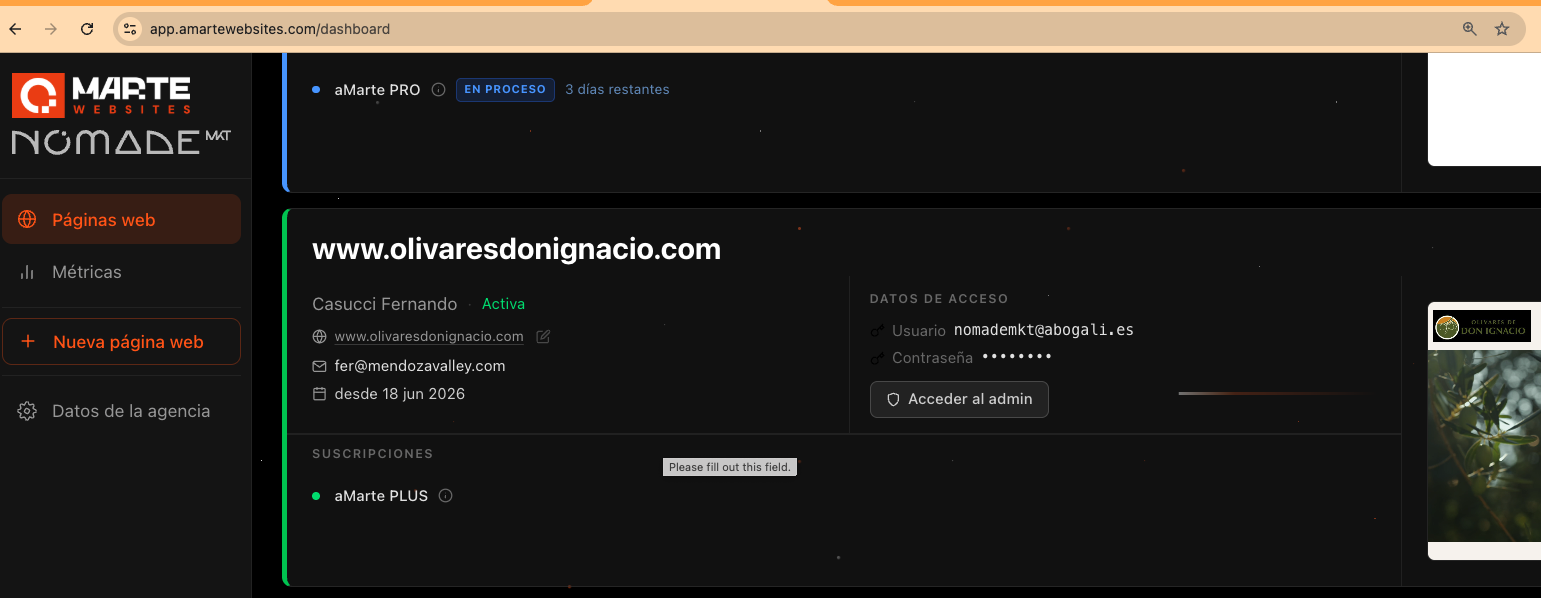
Each website appears as an individual card with all the relevant client information:
- –Website name and main domain: with direct access to the site and its admin panel.
- –Website type: CMS (content management) or Pixel Perfect (high-fidelity fixed design).
- –Real-time website preview captured automatically.
- –Subscription status and next renewal date.
- –Quick access to TinaCMS credentials if the client has them configured.
Subscription status
Each card visually indicates the client's subscription status:
- –Active (green): the subscription is up to date and working normally.
- –In progress (blue): the client is in a trial period. The remaining days are also shown.
- –Subscription issues (red): there is a payment failure. It's worth checking the client's payment method.
- –No subscription (grey): the client has no active subscription associated.
Agency metrics
The metrics section gives you a quick overview of your portfolio's financial status:
- –Monthly revenue (MRR): sum of the monthly equivalent of all active client subscriptions. Trial periods are not included.
- –Active pages: clients with at least one active subscription (trials not counted).
- –Average ticket: MRR divided by the number of active pages.
- –Breakdown by product: how many pages each subscription type has and how much it contributes to total MRR.
All figures are calculated automatically from Stripe data.
Search and filters
Above the cards you'll find a search bar and filters to quickly find any page:
- –Text search: search by website name, domain or client email.
- –Website type: filter between CMS, Pixel Perfect or all.
- –Status: filter between active or inactive pages.
Filters can be combined.
Client access credentials
Each website card includes an **Access Data** section with the admin panel credentials: the username and password your client uses to edit their website.
This lets you manage your clients' access without having to ask them for their credentials each time. You can click **Access admin** directly from the card to enter the editing panel for that website with a single click.
Credentials are available for all active websites in your agency.
Ready to manage your clients from the dashboard?